
Plans & takeoffs
Takeoffs that turn into estimates.
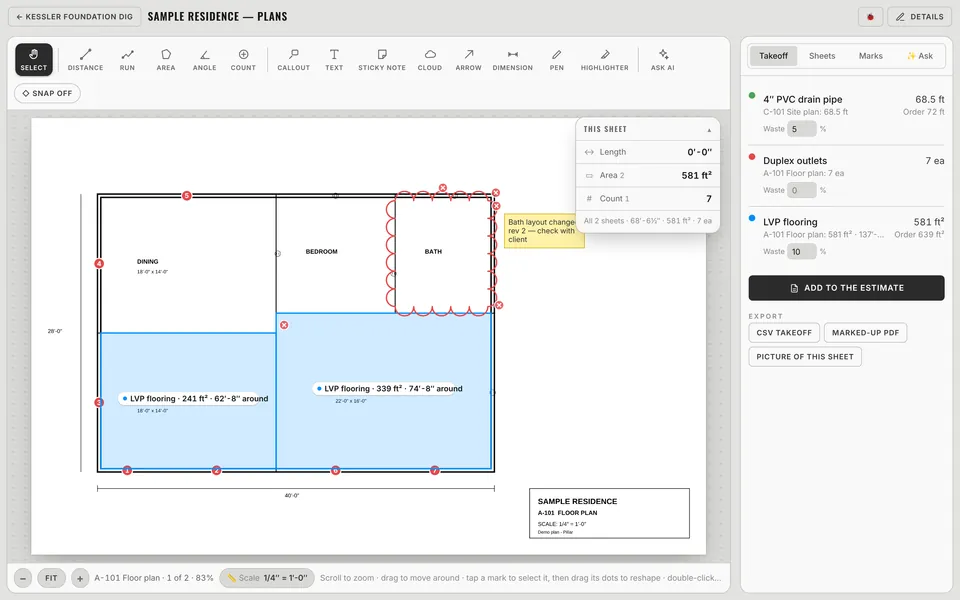
Upload a PDF plan set or a photo of the plans, set the scale once, and measure lengths, areas and counts. Mark it up, add waste, and send the quantities straight into an estimate.
Takeoffs
Every tool you reach for on a plan
Distance, run, area, angle and count, plus callouts, text, sticky notes, clouds, arrows, dimensions, pen and highlighter. Snap to lines, zoom with a finger magnifier on phones, and keep a running takeoff total.
- Scale is set once for the whole plan
- Waste % per item, with the order quantity
- Export a CSV takeoff or a marked-up PDF
- Plans attach to the job so the crew can see them
Measure
Measure a property from the sky
No plans? Type the address and outline lawns, driveways, patios, decks, beds, fences, edging and gutters on satellite imagery. Pillar can even measure the whole roof automatically, with squares and pitch.
- Area and length for each shape, with totals
- Your own price per sq ft, linear ft or square
- Make an estimate with one line per item
- Automatic roof measurement for most addresses
Questions
Plans & takeoffs: common questions
What files can I take off from?
PDF plan sets and photos of plans. Upload them to a job, set the scale, and start measuring. Multi-sheet sets keep their sheets.
Can I measure a roof or driveway without going out?
Yes. Pillar's Measure tool uses satellite imagery: outline the area or line, or let it measure the roof automatically with squares and pitch, then turn it into an estimate.
Works together
The rest of Pillar
Every feature shares the same jobs, clients and numbers, so nothing gets typed twice.
Estimates & invoices
E-sign, deposits, online payments
Scheduling & routes
Calendar, routes, online booking
Crew app & time clock
GPS clock-in, photos, timesheets
Pillar AI
Ask anything, make changes by talking
Finances & QuickBooks
Bank sync, job costing, P&L
Weather planning
Rain flags, swap ideas, 6 AM alerts
Run the whole business from one app.
Estimates, schedule, crew, money and an AI that knows your jobs. Try Pillar free for a month. No card needed.